Why Build Custom Heft Plugins? In the old Gulp-based SPFx toolchain, you could extend the build process by creating custom Gulp tasks. With Heft, custom plugins are the modern replacement for those tasks.
Gulp Tasks vs Heft Plugins Old Approach (Gulp):
const gulp = require ('gulp' );const build = require ('@microsoft/sp-build-web' );build.task ('increment-version' , { execute : (config ) => { return new Promise ((resolve, reject ) => { resolve (); }); } }); build.initialize (gulp);
New Approach (Heft):
export default class VersionIncrementerPlugin implements IHeftTaskPlugin <IOptions > { public apply (taskSession, heftConfig, options ) { taskSession.hooks .run .tapPromise ('my-plugin' , async () => { }); } }
Key Differences:
Aspect
Gulp Tasks
Heft Plugins
Language
JavaScript
TypeScript (with types!)
Architecture
Stream-based
Hook-based
Type Safety
None
Full TypeScript support
Lifecycle
Sequential tasks
Event-driven hooks
Configuration
Code-based
JSON schema-validated
Reusability
Difficult
Easy (npm packages)
When Do You Need a Custom Plugin? Common Use Cases ✅ Perfect for Custom Plugins:
Version Management
Auto-increment version numbers
Sync versions across files
Generate changelogs
File Operations
Copy assets to specific locations
Generate files (manifests, configs)
Clean up temporary files
Build Notifications
Send Slack/Teams messages
Email build reports
Update dashboards
Custom Validation
Check bundle size limits
Validate manifest files
Security scanning
Environment Configuration
Replace environment tokens
Swap API endpoints
Inject build metadata
Documentation Generation
Generate API docs
Create README files
Update changelogs
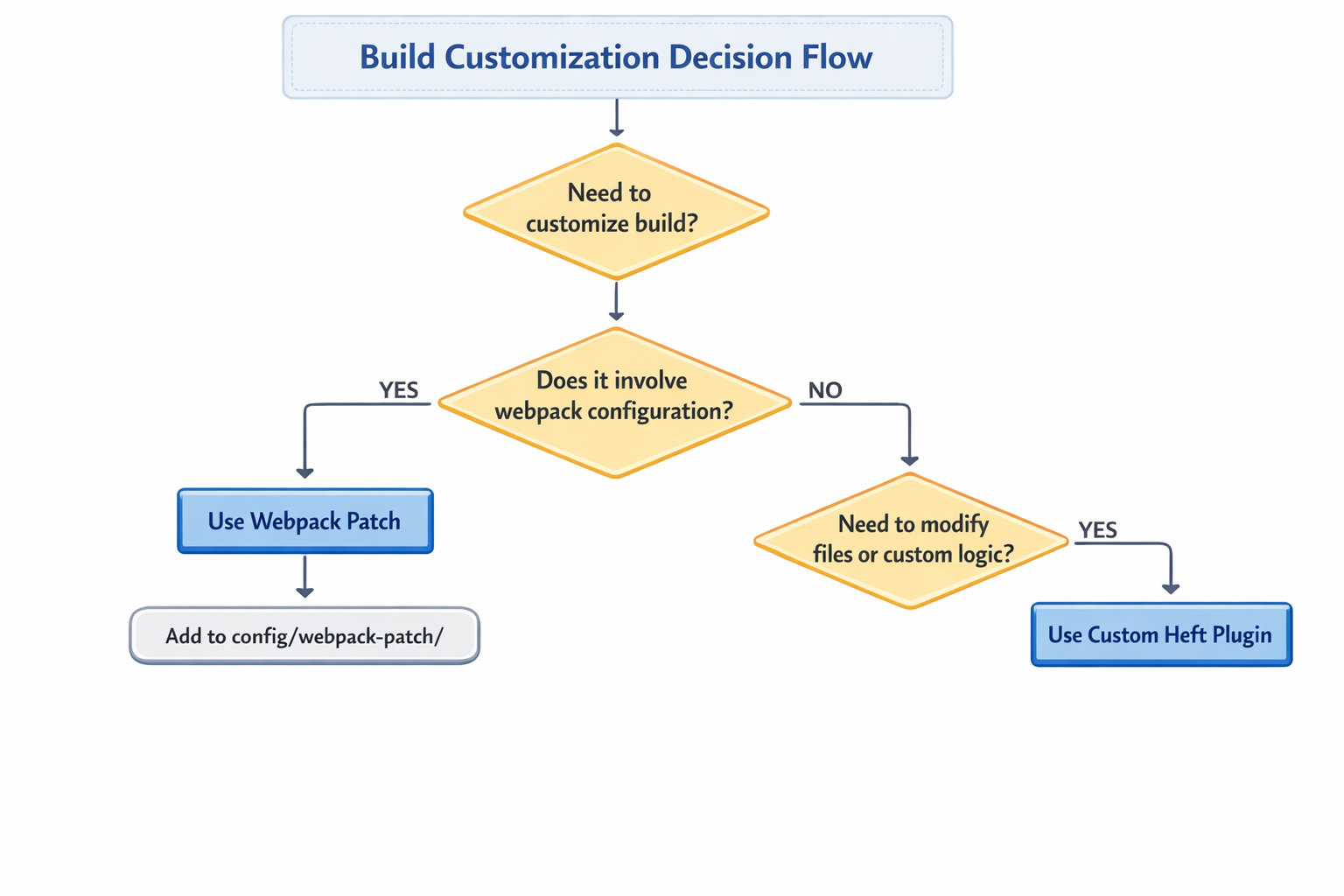
❌ NOT for Custom Plugins (use Webpack Patches instead):
Modifying webpack configuration
Adding webpack loaders
Changing webpack plugins
Webpack-specific customizations
Plugin vs Webpack Patch Decision Tree
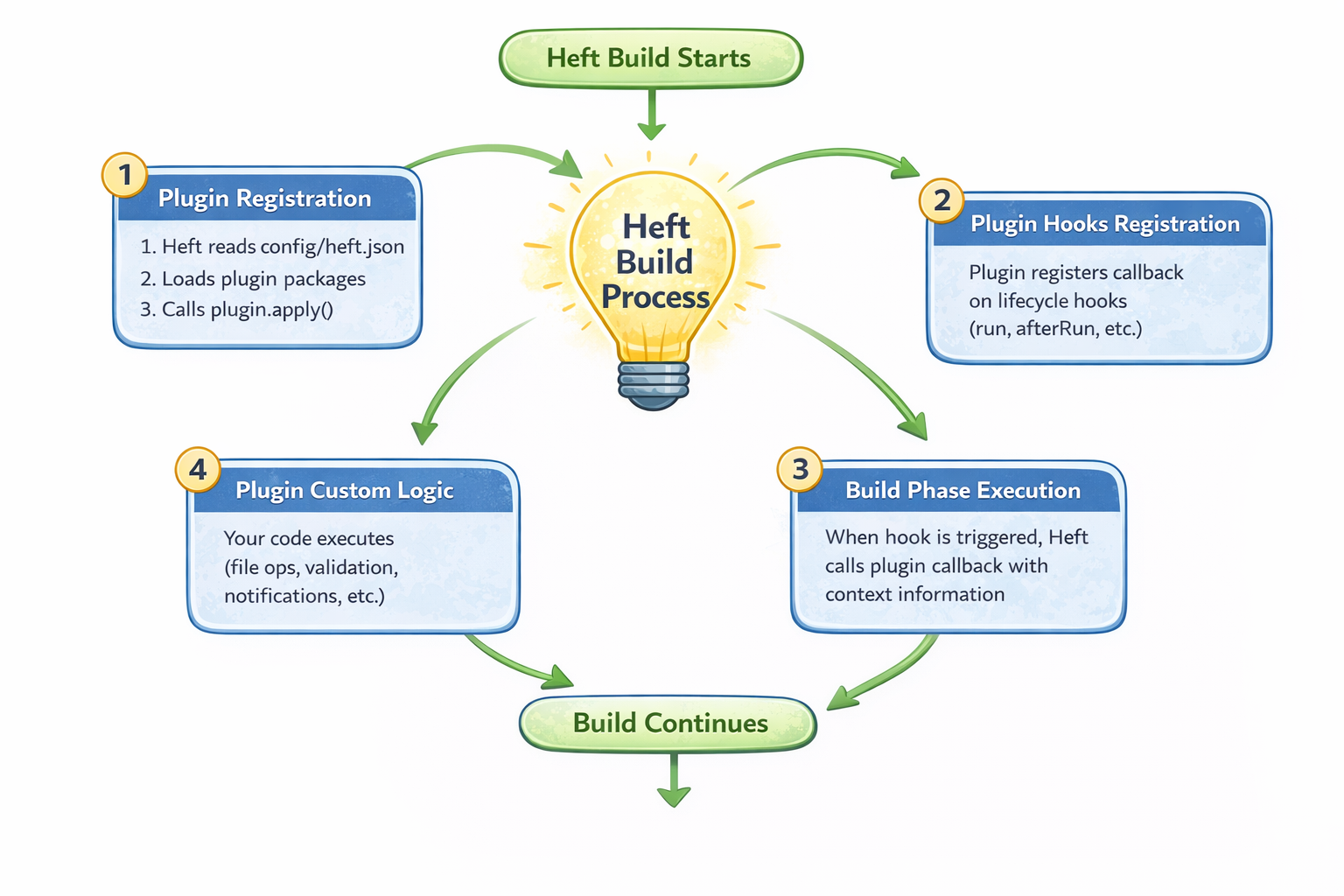
Understanding Heft Plugin Architecture Plugin Lifecycle Heft plugins integrate into the build process through lifecycle hooks . Here’s how it works:
Heft Build Starts
The build process is initiated via Heft.
Plugin Registration
Heft reads config/heft.json
Plugin packages are discovered and loaded
plugin.apply() is invoked for each registered plugin
Plugin Hooks Registration
Plugins register callbacks against lifecycle hooks
Common hooks include:
runafterRunOther phase-specific hooks
Build Phase Execution
As the build progresses, Heft triggers lifecycle hooks
Registered plugin callbacks are executed
Context information is passed to the plugin
Plugin Custom Logic
Custom plugin code runs:
File operations
Validation checks
Notifications
Reporting or enforcement logic
Build Continues
Heft resumes the remaining build pipeline
Key Plugin Components Every Heft plugin consists of these essential parts:
Plugin Class - Implements IHeftTaskPlugin<TOptions>apply() Method - Entry point where hooks are registeredOptions Interface - TypeScript types for configurationJSON Schema - Validates options at runtimeMetadata File - heft-plugin.json for discoveryPackage Definition - package.json with dependencies
Plugin Interface import type { HeftConfiguration , IHeftTaskSession , IHeftTaskPlugin , IHeftTaskRunHookOptions , } from '@rushstack/heft' ; interface IMyPluginOptions { } export default class MyPlugin implements IHeftTaskPlugin <IMyPluginOptions > { public apply ( taskSession : IHeftTaskSession , heftConfiguration : HeftConfiguration , pluginOptions ?: IMyPluginOptions ): void { } }
Available Lifecycle Hooks Heft provides several hooks you can tap into:
taskSession.hooks .run .tapPromise ('plugin-name' , async (runOptions) => { }); taskSession.hooks .afterRun .tapPromise ('plugin-name' , async () => { });
Most Common Hook : taskSession.hooks.run - Executes during task execution
Real-World Example: Version Incrementer Plugin Let’s build a complete, production-ready plugin that solves a real problem: automatically incrementing version numbers during production builds.
The Problem In SPFx development, you manage versions in two places:
package.json0.0.1config/package-solution.json0.0.1.0
Manual version management is error-prone and tedious. We need automation!
SPFx uses a 4-part versioning scheme:
Format: major.minor.patch.revision
Part
Purpose
When to Increment
Example
major
Breaking changes
API changes, major refactors
1.0.0.0 → 2.0.0.0
minor
New features
New functionality (backward compatible)
0.1.0.0 → 0.2.0.0
patch
Bug fixes
Hotfixes, minor corrections
0.0.1.0 → 0.0.2.0
revision
Build number
CI/CD builds, no code changes
0.0.2.0 → 0.0.2.1
Plugin Requirements Our version incrementer plugin will:
✅ Support all four increment strategies (major, minor, patch, build)
✅ Update both package.json and package-solution.json
✅ Only run on production builds (configurable)
✅ Use proper TypeScript typing
✅ Validate options with JSON schema
✅ Provide clear logging
✅ Handle errors gracefully
Step 1: Project Structure Create the plugin directory structure:
mkdir -p heft-plugins/version-incrementer-plugin/srccd heft-plugins/version-incrementer-plugin
Complete structure:
heft-plugins/
└── version-incrementer-plugin/
    ├── src/
    │   ├── VersionIncrementerPlugin.ts     # Main plugin
    │   └── version-incrementer-plugin.schema.json  # Options schema
    ├── lib/                                 # Compiled output
    │   ├── VersionIncrementerPlugin.js
    │   ├── VersionIncrementerPlugin.d.ts
    │   └── version-incrementer-plugin.schema.json
    ├── package.json                         # Plugin dependencies
    ├── tsconfig.json                        # TypeScript config
    └── heft-plugin.json                     # Plugin metadata
Step 2: Create package.json heft-plugins/version-incrementer-plugin/package.json
{ "name" : "version-incrementer-plugin" , "version" : "1.0.0" , "description" : "Heft plugin to auto-increment version for SPFx projects" , "main" : "lib/VersionIncrementerPlugin.js" , "types" : "lib/VersionIncrementerPlugin.d.ts" , "scripts" : { "build" : "tsc" , "clean" : "rimraf lib" } , "keywords" : [ "heft" , "spfx" , "sharepoint-framework" , "version" , "build-plugin" ] , "dependencies" : { "@rushstack/heft" : "^1.1.2" , "@rushstack/node-core-library" : "^5.11.4" , "semver" : "^7.6.0" } , "devDependencies" : { "@types/node" : "^22.0.0" , "@types/semver" : "^7.5.0" , "typescript" : "~5.8.0" } }
Key Dependencies:
@rushstack/heft : Core Heft types and interfaces@rushstack/node-core-library : File system utilities (JsonFile, FileSystem)semver : Semantic versioning library for increment logic
Step 3: TypeScript Configuration heft-plugins/version-incrementer-plugin/tsconfig.json
{ "compilerOptions" : { "target" : "ES2020" , "module" : "commonjs" , "lib" : [ "ES2020" ] , "outDir" : "./lib" , "rootDir" : "./src" , "declaration" : true , "declarationMap" : true , "sourceMap" : true , "strict" : true , "esModuleInterop" : true , "skipLibCheck" : true , "forceConsistentCasingInFileNames" : true , "moduleResolution" : "node" , "resolveJsonModule" : true } , "include" : [ "src/**/*" ] , "exclude" : [ "node_modules" , "lib" ] }
Important Settings:
declaration: true - Generate .d.ts files for TypeScript consumersstrict: true - Enable all strict type checkingresolveJsonModule: true - Allow importing JSON files
heft-plugins/version-incrementer-plugin/heft-plugin.json
{ "$schema" : "https://developer.microsoft.com/json-schemas/heft/v0/heft-plugin.schema.json" , "taskPlugins" : [ { "pluginName" : "version-incrementer-plugin" , "entryPoint" : "./lib/VersionIncrementerPlugin.js" , "optionsSchema" : "./lib/version-incrementer-plugin.schema.json" } ] }
What This Does:
Tells Heft where to find the plugin entry point
Specifies the JSON schema for option validation
Registers the plugin name for reference in heft.json
Step 5: Options Schema heft-plugins/version-incrementer-plugin/src/version-incrementer-plugin.schema.json
{ "$schema" : "http://json-schema.org/draft-07/schema#" , "title" : "Version Incrementer Plugin Options" , "description" : "Configuration options for the version incrementer Heft plugin" , "type" : "object" , "properties" : { "strategy" : { "type" : "string" , "enum" : [ "major" , "minor" , "patch" , "build" ] , "description" : "Version increment strategy: major, minor, patch (updates package.json), or build (updates only package-solution.json 4th digit)" , "default" : "patch" } , "productionOnly" : { "type" : "boolean" , "description" : "Only increment version on production builds (when --production flag is used)" , "default" : true } , "updatePackageSolution" : { "type" : "boolean" , "description" : "Update config/package-solution.json version" , "default" : true } } , "additionalProperties" : false }
Schema Benefits:
✅ Runtime validation of options
✅ IDE autocomplete in heft.json
✅ Clear documentation of available options
✅ Prevents typos and invalid configurations
Step 6: Implement the Plugin heft-plugins/version-incrementer-plugin/src/VersionIncrementerPlugin.ts
import type { HeftConfiguration , IHeftTaskSession , IHeftTaskPlugin , IHeftTaskRunHookOptions , } from '@rushstack/heft' ; import { FileSystem , JsonFile } from '@rushstack/node-core-library' ;import * as semver from 'semver' ;import * as path from 'path' ;interface IVersionIncrementerPluginOptions { strategy ?: 'major' | 'minor' | 'patch' | 'build' ; productionOnly ?: boolean ; updatePackageSolution ?: boolean ; } interface IPackageJson { version : string ; [key : string ]: any ; } interface IPackageSolutionJson { solution : { version : string ; [key : string ]: any ; }; [key : string ]: any ; } const PLUGIN_NAME = 'version-incrementer-plugin' ;export default class VersionIncrementerPlugin implements IHeftTaskPlugin <IVersionIncrementerPluginOptions > { public apply ( taskSession : IHeftTaskSession , heftConfiguration : HeftConfiguration , pluginOptions ?: IVersionIncrementerPluginOptions ): void { taskSession.hooks .run .tapPromise ( PLUGIN_NAME , async (runOptions : IHeftTaskRunHookOptions ) => { const logger = taskSession.logger ; const projectRoot = heftConfiguration.buildFolderPath ; const options : Required <IVersionIncrementerPluginOptions > = { strategy : pluginOptions?.strategy || 'patch' , productionOnly : pluginOptions?.productionOnly !== false , updatePackageSolution : pluginOptions?.updatePackageSolution !== false , }; const isProductionBuild = (runOptions as any ).production === true || taskSession.parameters .production ; if (options.productionOnly && !isProductionBuild) { logger.terminal .writeVerboseLine ( `[${PLUGIN_NAME} ] Skipping version increment (not a production build)` ); return ; } logger.terminal .writeLine ( `[${PLUGIN_NAME} ] Starting version increment with strategy: ${options.strategy} ` ); try { await this ._updatePackageJson ( projectRoot, options.strategy , logger ); if (options.updatePackageSolution ) { await this ._updatePackageSolution ( projectRoot, options.strategy , logger ); } logger.terminal .writeLine ( `[${PLUGIN_NAME} ] ✅ Version increment completed successfully!` ); } catch (error) { logger.terminal .writeErrorLine ( `[${PLUGIN_NAME} ] ❌ Error: ${error} ` ); throw error; } } ); } private async _updatePackageJson ( projectRoot : string , strategy : 'major' | 'minor' | 'patch' | 'build' , logger : any ): Promise <string > { const packageJsonPath = path.join (projectRoot, 'package.json' ); const packageJson : IPackageJson = await JsonFile .loadAsync (packageJsonPath); const currentVersion = packageJson.version ; logger.terminal .writeLine ( `[${PLUGIN_NAME} ] Current package.json version: ${currentVersion} ` ); if (strategy === 'build' ) { logger.terminal .writeLine ( `[${PLUGIN_NAME} ] Using 'build' strategy - package.json unchanged` ); return currentVersion; } const newVersion = semver.inc (currentVersion, strategy); if (!newVersion) { throw new Error ( `Failed to increment version from ${currentVersion} using strategy '${strategy} '` ); } packageJson.version = newVersion; await JsonFile .saveAsync (packageJson, packageJsonPath, { updateExistingFile : true , }); logger.terminal .writeLine ( `[${PLUGIN_NAME} ] ✓ Updated package.json: ${currentVersion} → ${newVersion} ` ); return newVersion; } private async _updatePackageSolution ( projectRoot : string , strategy : 'major' | 'minor' | 'patch' | 'build' , logger : any ): Promise <void > { const solutionPath = path.join ( projectRoot, 'config' , 'package-solution.json' ); if (!await FileSystem .existsAsync (solutionPath)) { logger.terminal .writeWarningLine ( `[${PLUGIN_NAME} ] package-solution.json not found, skipping` ); return ; } const solutionJson : IPackageSolutionJson = await JsonFile .loadAsync (solutionPath); const currentVersion = solutionJson.solution .version ; logger.terminal .writeLine ( `[${PLUGIN_NAME} ] Current package-solution.json version: ${currentVersion} ` ); let newVersion : string ; if (strategy === 'build' ) { newVersion = this ._incrementBuildNumber (currentVersion); } else { const packageJsonPath = path.join (projectRoot, 'package.json' ); const packageJson : IPackageJson = await JsonFile .loadAsync (packageJsonPath); const versionParts = packageJson.version .split ('.' ); if (versionParts.length >= 3 ) { newVersion = `${versionParts[0 ]} .${versionParts[1 ]} .${versionParts[2 ]} .0` ; } else { newVersion = `${packageJson.version} .0` ; } } solutionJson.solution .version = newVersion; await JsonFile .saveAsync (solutionJson, solutionPath, { updateExistingFile : true , }); logger.terminal .writeLine ( `[${PLUGIN_NAME} ] ✓ Updated package-solution.json: ${currentVersion} → ${newVersion} ` ); } private _incrementBuildNumber (version : string ): string { const parts = version.split ('.' ); if (parts.length === 4 ) { const revision = parseInt (parts[3 ], 10 ) + 1 ; return `${parts[0 ]} .${parts[1 ]} .${parts[2 ]} .${revision} ` ; } else if (parts.length === 3 ) { return `${version} .1` ; } else { throw new Error (`Invalid version format: ${version} ` ); } } }
Code Walkthrough 1. Plugin Class Structure
export default class VersionIncrementerPlugin implements IHeftTaskPlugin <IVersionIncrementerPluginOptions >
Must implement IHeftTaskPlugin<TOptions> interface
Generic type TOptions provides type safety for plugin options
2. The apply() Method
public apply ( taskSession : IHeftTaskSession , heftConfiguration : HeftConfiguration , pluginOptions ?: IVersionIncrementerPluginOptions ): void
Called when plugin is loaded
Receives task session, configuration, and user-provided options
Registers lifecycle hooks here
3. Hook Registration
taskSession.hooks .run .tapPromise (PLUGIN_NAME , async (runOptions) => { });
tapPromise for async operationsFirst parameter is plugin name (for logging)
Second parameter is async callback function
4. Production Check
const isProductionBuild = (runOptions as any ).production === true || taskSession.parameters .production ;
Checks if --production flag was used
Allows skipping version increment during development
5. File Operations
const packageJson = await JsonFile .loadAsync (packageJsonPath);packageJson.version = newVersion; await JsonFile .saveAsync (packageJson, packageJsonPath, { updateExistingFile : true });
Uses JsonFile from @rushstack/node-core-library
Safer than fs.readFile + JSON.parse (handles errors, formatting)
6. Logging
logger.terminal .writeLine (`[${PLUGIN_NAME} ] Message` ); logger.terminal .writeErrorLine (`[${PLUGIN_NAME} ] Error` ); logger.terminal .writeVerboseLine (`[${PLUGIN_NAME} ] Debug` );
logger.terminal outputs to consolePrefix with plugin name for clarity
Step 7: Register Plugin in SPFx Project Now let’s integrate the plugin into your SPFx project.
7.1 Update Project package.json Add npm workspaces to link the local plugin:
{ "name" : "my-heft-webpart" , "version" : "0.0.1" , "private" : true , "workspaces" : [ "heft-plugins/version-incrementer-plugin" ] , "scripts" : { "build" : "heft test --clean --production && heft package-solution --production" , "start" : "heft start --clean" } }
Why workspaces?
Links local plugin without publishing to npm
Changes to plugin are immediately available
Perfect for development and testing
7.2 Create config/heft.json Create (or update) config/heft.json
{ "$schema" : "https://developer.microsoft.com/json-schemas/heft/v0/heft.schema.json" , "extends" : "@microsoft/spfx-web-build-rig/profiles/default/config/heft.json" , "phasesByName" : { "build" : { "tasksByName" : { "version-incrementer" : { "taskDependencies" : [ "set-browserslist-ignore-old-data-env-var" ] , "taskPlugin" : { "pluginPackage" : "version-incrementer-plugin" , "pluginName" : "version-incrementer-plugin" , "options" : { "strategy" : "patch" , "productionOnly" : true , "updatePackageSolution" : true } } } } } } }
Configuration Breakdown:
Field
Purpose
Value
extendsInherit SPFx base config
Rig path
phasesByName.buildTarget build phase
Built-in phase
tasksByNameDefine custom tasks
Your plugin
taskDependenciesRun after specific tasks
Environment setup
pluginPackagePlugin package name
From package.json
pluginNamePlugin identifier
From heft-plugin.json
optionsPlugin configuration
Validated by schema
Task Dependencies:
set-browserslist-ignore-old-data-env-var
    ↓
version-incrementer (YOUR PLUGIN)
    ↓
sass
    ↓
typescript
Setting taskDependencies ensures your plugin runs at the right time.
Step 8: Install and Build cd heft-plugins/version-incrementer-pluginnpm install npm run build cp src/version-incrementer-plugin.schema.json lib/cd ../..npm install
Don't forget to copy the schema file to lib/! Heft looks for it at runtime.
Step 9: Test the Plugin Test 1: Development Build (Should Skip) Expected Output:
---- start started ----
[build:version-incrementer] Skipping version increment (not a production build)
[build:sass] Generating sass typings...
✅ Plugin skips during development!
Test 2: Production Build (Should Increment) cat package.json | grep versionnpm run build
Expected Output:
---- build started ----
[build:set-browserslist-ignore-old-data-env-var] Setting environment variable...
[build:version-incrementer] Starting version increment with strategy: patch
[build:version-incrementer] Current package.json version: 0.0.1
[build:version-incrementer] ✓ Updated package.json: 0.0.1 → 0.0.2
[build:version-incrementer] Current package-solution.json version: 0.0.1.0
[build:version-incrementer] ✓ Updated package-solution.json: 0.0.1.0 → 0.0.2.0
[build:version-incrementer] ✅ Version increment completed successfully!
[build:sass] Generating sass typings...
[build:typescript] Using TypeScript version 5.8.3
...
Verify Results Check package.json:
cat package.json | grep version
Check package-solution.json:
cat config/package-solution.json | grep version
Check .sppkg file:
unzip -p sharepoint/solution/*.sppkg manifest.json | grep version
Step 10: Test Different Strategies Strategy: minor Update config/heft.json:
{ "options" : { "strategy" : "minor" , "productionOnly" : true , "updatePackageSolution" : true } }
Run build:
Before: 0.0.2 → 0.0.2.0
After:  0.1.0 → 0.1.0.0
Strategy: build Update config/heft.json:
{ "options" : { "strategy" : "build" , "productionOnly" : true , "updatePackageSolution" : true } }
Run build:
Before: 0.1.0 (unchanged) → 0.1.0.0
After:  0.1.0 (unchanged) → 0.1.0.1
Perfect for CI/CD scenarios where you only want to bump the build number!
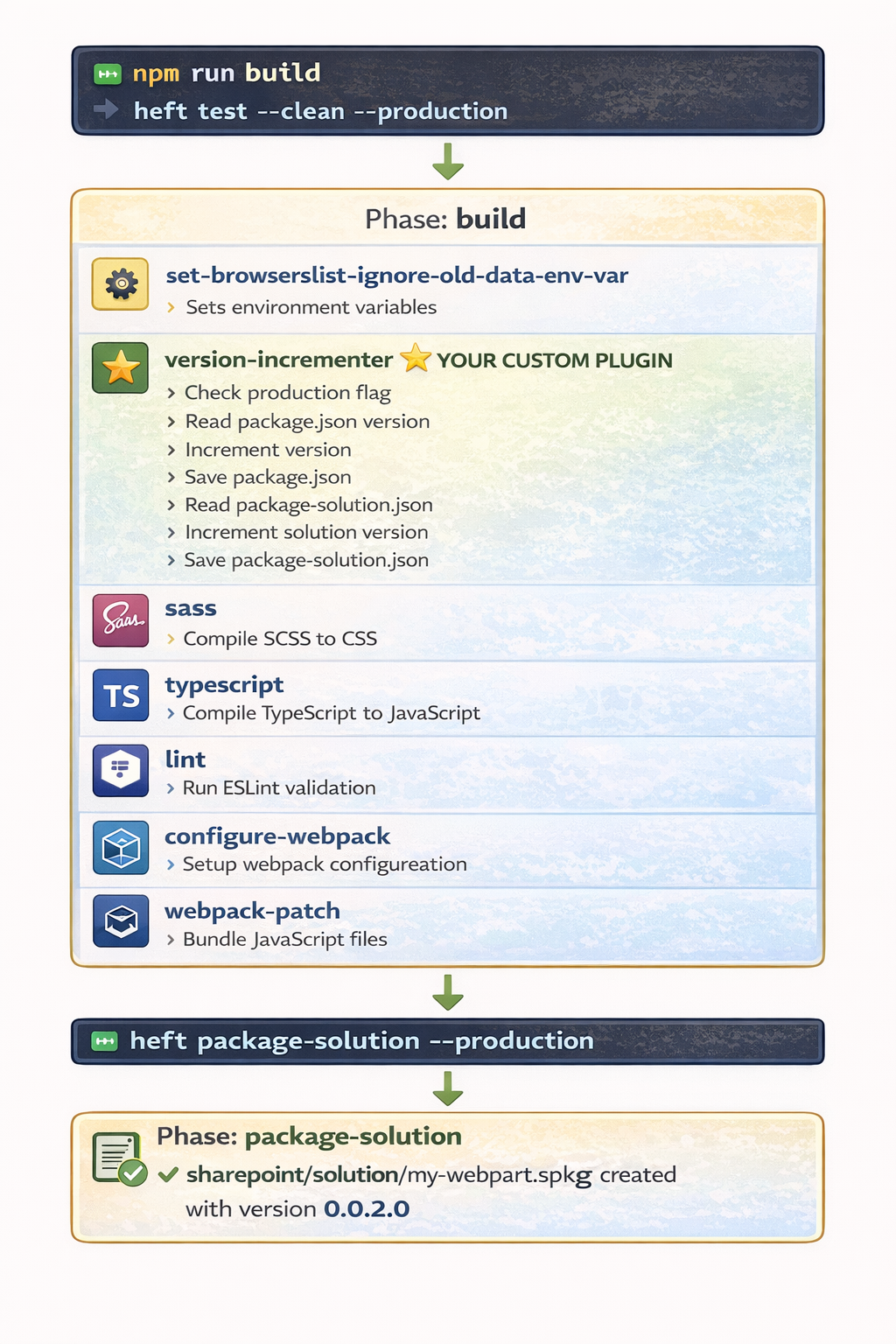
Understanding Plugin Execution in the Pipeline Complete Build Pipeline When you run npm run build, here’s the complete execution flow:
Why execution order matters:
✅ Version updates before compilation
✅ TypeScript compilation includes new version
✅ Webpack bundles reference updated version
✅ .sppkg file has correct version metadata
Best Practices for Plugin Development 1. Error Handling Always handle errors gracefully and fail the build:
try { await this ._updatePackageJson (projectRoot, strategy, logger); } catch (error) { logger.terminal .writeErrorLine (`[${PLUGIN_NAME} ] Error: ${error} ` ); throw error; }
❌ Don’t do this:
catch (error) { console .log ('Error:' , error); }
2. Logging Provide clear, prefixed logging:
✅ Good : logger.terminal .writeLine (`[my-plugin] Starting process...` ); logger.terminal .writeLine (`[my-plugin] ✓ Updated file.json` ); logger.terminal .writeErrorLine (`[my-plugin] ❌ Failed to read file` ); ❌ Bad : console .log ('Starting...' ); console .log ('Done' );
3. Type Safety Use TypeScript interfaces for everything:
✅ Good : interface IPluginOptions { strategy : 'major' | 'minor' | 'patch' ; enabled : boolean ; } ❌ Bad : function apply (taskSession : any , config : any , options : any
4. Configuration Validation Always provide JSON schema:
✅ Good : { "type" : "string" , "enum" : ["major" , "minor" , "patch" ], "default" : "patch" } ❌ Bad :
5. Production-Only Operations For expensive operations, check production flag:
✅ Good : if (options.productionOnly && !isProductionBuild) { logger.terminal .writeVerboseLine ('Skipping (dev build)' ); return ; } ❌ Bad :
6. File Operations Use Rush Stack utilities, not raw Node.js:
✅ Good : const data = await JsonFile .loadAsync (filePath);await JsonFile .saveAsync (data, filePath, { updateExistingFile : true });❌ Bad : const data = JSON .parse (fs.readFileSync (filePath, 'utf8' ));fs.writeFileSync (filePath, JSON .stringify (data));
7. Plugin Naming Use consistent naming across files:
✅ Good:
Plugin class: VersionIncrementerPlugin
Package name: version-incrementer-plugin
Task name:    version-incrementer
Log prefix:   [version-incrementer]

❌ Bad:
Different names everywhere
Conclusion Custom Heft plugins unlock the full power of the SPFx 1.22 build system. They provide:
✅ Type-safe extensibility with TypeScriptClean architecture with lifecycle hooksValidated configuration via JSON schemasBetter performance than Gulp tasksReusability across projects
Key Takeaways
Plugins replace Gulp tasks - They’re the modern way to extend SPFx buildsUse TypeScript - Full type safety and better developer experienceHook into lifecycle - taskSession.hooks.run.tapPromise() is your entry pointValidate options - JSON schema prevents configuration errorsHandle errors - Always throw to fail the buildLog clearly - Prefix messages with plugin nameTest thoroughly - Both dev and production builds
Resources Official Documentation:
Sample Code:
Previous Article:
Happy plugin development! 🚀